
What Are the Copilot Upcoming Features?
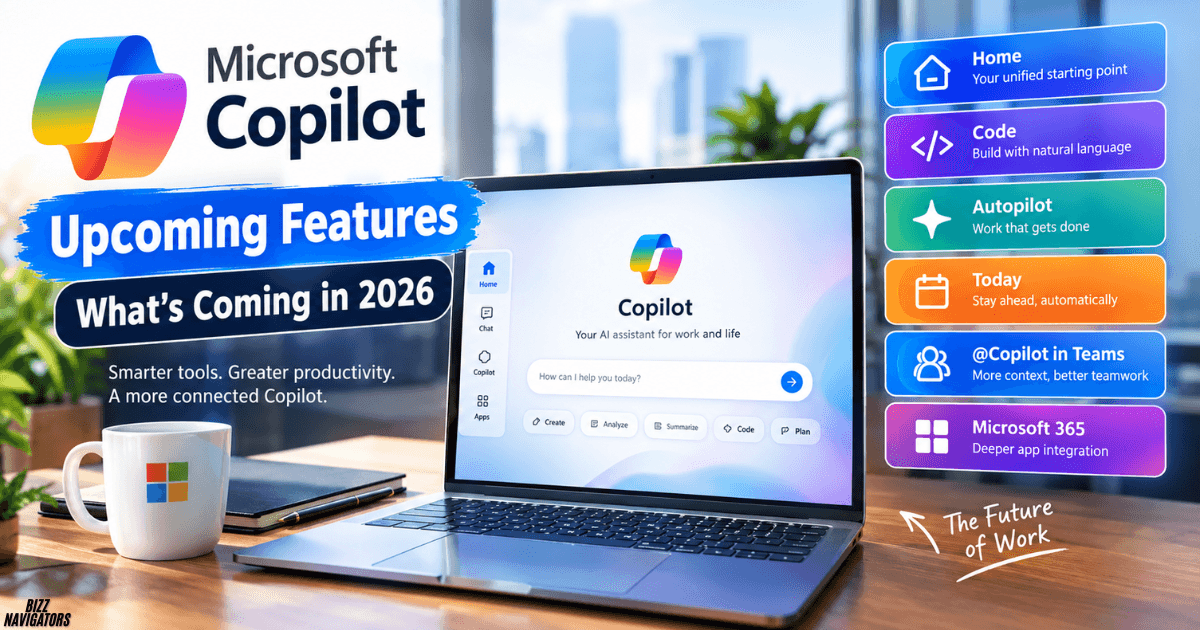
The main Copilot upcoming features include Home, Code, Autopilot, Today, improved Teams integration, and deeper Microsoft 365 integration.
Microsoft is moving Copilot beyond simple questions and answers. The new features are designed to help users research, create, build, delegate tasks, and manage work with less manual effort.
Some features are already available to selected users, while others are still in Frontier or private preview.
Quick Look at the New Features
- Home: A central place for Copilot activity
- Code: Build apps and solutions with natural language
- Autopilot: Let AI handle ongoing tasks
- Today: Get proactive updates and suggested actions
- @Copilot in Teams: Use shared team context
- Microsoft 365 integration: Work more directly inside Office apps
- Microsoft IQ: Give Copilot more business context
- Plugin registry: Manage Copilot extensions from one place
Copilot Home
Copilot Home is becoming the main starting point for the new Copilot experience.
Microsoft is bringing Chat and Cowork together in Home. Chat is useful for questions, research, writing, and quick tasks. Cowork is designed for larger jobs that Copilot can handle across multiple steps.
For example, instead of asking for five separate tasks, users can give Copilot a larger goal and let it work through the required steps.
Home can also help users return to recent work instead of starting from scratch.
Microsoft says Home is entering its Frontier rollout alongside Copilot Code.
Copilot Code
Copilot Code is designed to help users build applications and solutions with natural-language instructions.
You do not always need to start by writing code manually. Instead, you can describe what you want to build and use Copilot to help create the solution.
This can be useful for developers, analysts, business teams, operations staff, and other users who need custom tools.
Microsoft says Copilot Code uses the same underlying technology as GitHub Copilot.
What Can Copilot Code Help With?
Potential use cases include:
- Internal business tools
- Simple applications
- Workflow automation
- Data-related solutions
- Custom productivity tools
The important change is that Copilot is becoming useful not only for writing code, but also for building complete solutions.
Copilot Autopilot
Copilot Autopilot is designed for tasks that need more than one prompt.
Microsoft announced Autopilot as an always-on personal agent. It can work on tasks and continue progressing without requiring users to provide every next instruction.
Microsoft says Autopilot is moving into private preview at the end of September 2026.
This is an important shift in how Copilot works.
Instead of:
Ask → Get answer → Take action
the goal is closer to:
Give a goal → Copilot works → Review the result
Users will still need appropriate controls and permissions, especially when an AI agent can take actions on their behalf.
Copilot Today
Today is designed to make Copilot more proactive.
It can bring together useful information from areas such as email, calendar, Teams, meetings, and tasks.
Instead of waiting for users to ask what happened during the day, Copilot can surface information that may need attention.
Microsoft says Today is planned for private preview in October 2026.
This could make Copilot more useful for people who manage multiple meetings, projects, and deadlines.
@Copilot in Microsoft Teams
Microsoft is also expanding @Copilot in Teams.
The feature is designed to use the context available in a Teams channel, group chat, or meeting, subject to the user’s permissions.
That means users can ask Copilot about a conversation without having to explain all of its background again.
For example, Copilot could help identify:
- Important decisions
- Open questions
- Task owners
- Dependencies
- Unresolved issues
Microsoft says the new @Copilot experience is planned for private preview by the end of September 2026.
Microsoft 365 Copilot Updates
Copilot is also becoming more connected to Word, Excel, PowerPoint, and Outlook.
Microsoft has already introduced agentic capabilities in Word, Excel, and PowerPoint that can perform multi-step tasks inside these applications.
This matters because users can work with AI closer to where the actual work happens.
For example, instead of copying information from Copilot into a spreadsheet, Copilot can increasingly work directly with the spreadsheet.
The same approach applies to documents and presentations.
Microsoft IQ Gives Copilot More Context
Another major part of Microsoft’s Copilot strategy is business context.
Microsoft IQ is designed to help Copilot understand relevant organizational information. Microsoft is also expanding this approach through Fabric IQ, Dynamics 365, and Power Platform.
Better context can produce more useful results.
For example, an employee working on a sales proposal could potentially use relevant customer, sales, and business information instead of relying only on the text entered into the prompt.
The quality of AI output increasingly depends on the quality and relevance of the information it can access.
New Copilot Plugin System
Microsoft is also introducing a unified plugin registry.
The aim is to bring Microsoft, partner, and custom plugins into one catalog.
For users, this can make Copilot extensions easier to discover.
For organizations, centralized management can make it easier for IT teams to control which plugins employees can use.
Copilot Upcoming Features vs. Current Capabilities
| Feature | What it does |
| Home | Brings major Copilot experiences together |
| Code | Helps build apps and solutions |
| Autopilot | Handles longer-running tasks |
| Today | Surfaces useful information proactively |
| @Copilot in Teams | Works with shared team context |
| Microsoft 365 | Brings AI closer to Office workflows |
| Microsoft IQ | Adds business and organizational context |
| Plugin Registry | Centralizes Copilot extensions |
When Will the New Copilot Features Be Available?
There is no single release date for all Copilot upcoming features.
Microsoft is rolling them out in stages.
Home and Code are entering the Frontier program. Autopilot is moving into private preview at the end of September 2026, while Today is planned for private preview in October.
Availability can depend on the user’s account, organization, region, and Microsoft rollout stage.
So, an announced feature may not appear immediately in every Copilot account.
What These Copilot Updates Mean for Users
The biggest change is simple: Copilot is moving from answering questions toward completing work.
Chat is still useful for quick answers and content creation. But newer features such as Cowork, Code, Autopilot, and Today are designed for more complex and ongoing tasks.
Microsoft is also giving Copilot more access to the context surrounding a user’s work.
That combination could make Copilot more useful for everyday productivity, software development, research, teamwork, and business workflows.
Frequently Asked Questions
What are the main Copilot upcoming features?
The main announced features include Home, Code, Autopilot, Today, @Copilot in Teams, deeper Microsoft 365 integration, Microsoft IQ, and a unified plugin registry.
What is Copilot Autopilot?
Copilot Autopilot is Microsoft’s planned always-on agent experience. It is designed to work on ongoing tasks instead of requiring a separate prompt for every step.
What is Copilot Code?
Copilot Code helps users create applications and solutions using natural-language instructions. It is designed to make AI-assisted development more accessible.
Is Copilot getting more proactive?
Yes. Features such as Autopilot and Today are designed to make Copilot more proactive by working on tasks or surfacing useful information without waiting for a detailed prompt every time.
Will everyone get the new Copilot features?
Not immediately. Microsoft is using Frontier and private-preview stages before wider availability. Release timing can also vary between features and users.
The Final Line
The latest Copilot upcoming features show that Microsoft is changing Copilot from a simple AI assistant into a broader work platform.
Home brings experiences together. Code helps build solutions. Autopilot is designed to handle ongoing work. Today, Copilot is more proactive, while Teams and Microsoft 365 integrations provide more useful context.

At BizzNavigators, we answer the questions you’re actually searching for, honestly and clearly. We check our facts before we publish anything, and if we’re not sure about something, we tell you instead of guessing. Whatever you’re looking for- a tech fix, a business tip, or a simple how-to- we want to give you an answer you can trust.