
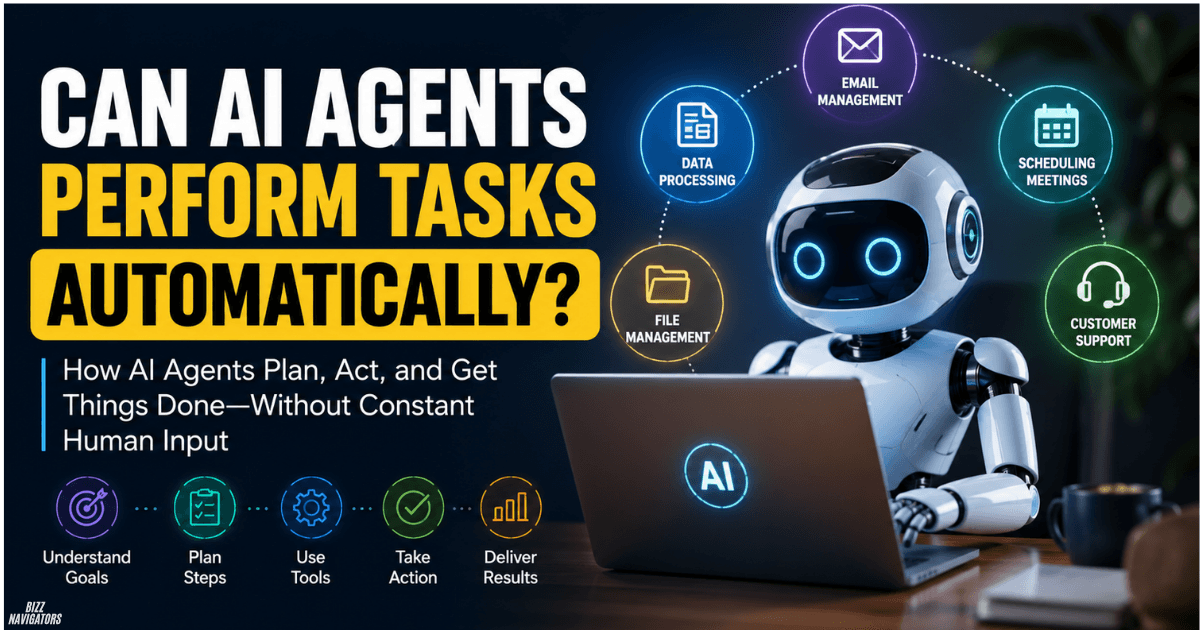
Can AI Agents Perform Tasks Automatically?
Yes, AI agents can perform tasks automatically by understanding a goal, planning the required steps, using connected tools, and taking actions with limited human input. They can handle multi-step work instead of simply generating an answer.
For example, an AI agent can read an email, identify the required action, search for information, update a file, and prepare a response without asking the user to control every step.
The level of automation depends on the agent’s tools, permissions, instructions, and safety controls.
How Do AI Agents Perform Tasks Automatically?
AI agents usually work through a simple loop: understand the goal, plan the work, use tools, check the result, and continue or stop.
This makes them different from basic chatbots and fixed automation.
1. They Understand the Goal
The agent first interprets what the user wants.
For example:
“Find a suitable meeting time and schedule it.”
The agent needs to understand that the final goal is not just finding a time. It also needs to complete the scheduling process.
2. They Break the Task Into Steps
The agent decides which actions are needed to reach the goal.
It might:
- Check calendars
- Find available times
- Compare options
- Select a suitable slot
- Create the event
- Send invitations
Modern agent systems can dynamically plan these steps rather than following one fixed sequence.
3. They Use External Tools
Tools allow an AI agent to do more than generate text.
Depending on its configuration, an agent may use:
- APIs
- Web browsers
- Databases
- Calendars
- Files
- Spreadsheets
- Code execution
- Business applications
NIST describes agent systems as AI-powered systems that can perceive their environment and use tools to take actions beyond simple text generation.
4. They Check What Happened
After taking an action, the agent can inspect the result.
If the action worked, it can continue.
If it failed, the agent may retry, change its approach, or ask a person for help.
Anthropic describes this process as a self-directed loop in which an agent plans, acts, observes the result, and adjusts until the task is complete or human input is required.
What Tasks Can AI Agents Automate?
AI agents can automate many digital tasks that involve several steps, changing information, and connected software.
Common examples include:
- Email management
- Calendar scheduling
- Data processing
- Customer support
- Research
- Report generation
- File management
- Software development
- Lead qualification
- Business workflows
The important requirement is that the agent must have access to the tools needed to perform the task.
Can AI Agents Automate Email?
Yes. An AI agent can read and classify emails, extract important information, draft replies, and route messages to the correct workflow.
For example, it could identify a customer request, check related information, and prepare a response.
Sending sensitive messages should usually require human approval.
Can AI Agents Automate Data Processing?
Yes. AI agents can extract information from documents, organize data, update spreadsheets, and work with databases.
They are particularly useful when information comes in different formats and requires interpretation before processing.
Google Cloud lists data cleaning, labeling, analysis, and workflow automation among practical agent use cases.
Can AI Agents Automate Scheduling?
Yes. An agent can check calendars, compare availability, select a suitable time, create a meeting, and send invitations when it has the required calendar permissions.
This is a good example of multi-step automation because several actions are connected to one goal.
Can AI Agents Automate Customer Support?
Yes. Agents can handle routine customer questions, search knowledge bases, retrieve information, and route complicated cases to human employees.
Businesses can also add approval steps before refunds, account changes, or other sensitive actions.
Are AI Agents the Same as Automation?
No. Traditional automation normally follows predefined rules, while AI agents can decide which steps to take based on the situation.
A traditional workflow might look like:
Trigger → Rule 1 → Rule 2 → Action
An AI agent can work more like:
Goal → Plan → Tool → Result → Adjust → Complete
Google Cloud describes AI agents as systems that can handle complex, multi-step tasks and make decisions with greater autonomy than traditional bots or assistants.
However, traditional automation is still better for simple and predictable workflows.
If a task always follows the same steps, a normal automation rule may be faster, cheaper, and easier to control.
Can AI Agents Act Autonomously?
Yes, AI agents can act autonomously, but autonomy is not unlimited.
An agent can be configured to work with:
- Full human approval
- Approval only for important actions
- Limited tool permissions
- Defined spending or access limits
- Automatic escalation when something goes wrong
NIST identifies autonomy as the degree to which an agent can take initiative or make decisions when using tools without user intervention.
So, autonomous does not mean uncontrolled.
A well-designed agent operates within rules set by its developer or user.
What Is the Difference Between an AI Agent and an AI Assistant?
An AI assistant mainly responds to user requests. An AI agent can take the next steps needed to accomplish a goal.
For example:
AI assistant:
“Here are three available meeting times.”
AI agent:
“Three times are available. I selected the best match, created the meeting, and sent the invitation.”
The difference is not simply intelligence. It is the ability to plan and execute actions through tools.
Can AI Agents Work Without Human Input?
Yes, they can work without constant human input when the workflow, tools, and permissions allow it.
Some agents can run for extended periods and complete multiple steps before stopping. Current agent systems are increasingly being used for coding, research, document work, email management, and other multi-step workflows.
But important tasks should still have human oversight.
For example, an agent might automatically organize routine emails but ask for approval before sending a sensitive business message.
What Do AI Agents Need to Automate Tasks?
An AI agent normally needs four main things:
1. AI model:
Provides reasoning and language understanding.
2. Tools:
Allow the agent to interact with software, websites, files, APIs, or other systems.
3. Instructions:
Define the goal, limits, and expected behavior.
4. Permissions:
Determine what the agent is allowed to access or change.
Google Cloud identifies models, grounding, tools, data architecture, orchestration, and runtime as important building blocks of agent systems.
Without the right tools and permissions, an AI agent may be able to explain how to complete a task but cannot actually perform it.
What Are the Risks of AI Agent Automation?
The biggest risk is that an agent can take an incorrect action instead of merely giving an incorrect answer.
For example, a wrong response in a chatbot can be ignored. A wrongly configured agent could send an email, modify a database, delete a file, or make another external change.
NIST highlights factors such as tool permissions, action risk, reliability, monitoring, and autonomy when evaluating agent systems.
Common risks include:
- Incorrect decisions
- Excessive permissions
- Data exposure
- Prompt injection
- Tool misuse
- Failed actions
- Unintended changes
The safest approach is to give agents only the permissions they need and require human approval for high-impact actions.
How Can You Automate Tasks With AI Agents Safely?
Start with a small, clearly defined workflow.
Then:
- Define exactly what the agent should accomplish.
- Connect only the tools it needs.
- Give it minimum required permissions.
- Add approval for sensitive actions.
- Test the workflow with realistic examples.
- Monitor the agent’s actions.
- Create rules for when it must stop and ask for help.
Google’s current agent documentation also recommends limiting tool permissions, testing tools in isolation, and verifying critical outputs before production use.
This approach gives you automation without giving the agent unnecessary control.
Can AI Agents Replace Human Workers?
AI agents can automate parts of many jobs, but they do not automatically replace entire professions.
They are strongest at repetitive digital work, information processing, research, coding, and structured workflows.
Humans remain important for judgment, accountability, strategy, creativity, relationships, and decisions where mistakes have serious consequences.
The more practical approach is often human + AI agent, where the agent handles execution and the human controls important decisions.
What Is the Main Benefit of AI Agent Automation?
The main benefit is that AI agents can connect several actions into one goal.
Instead of manually moving between email, spreadsheets, calendars, websites, and business applications, an agent can coordinate multiple steps when the necessary tools are connected.
That can reduce repetitive work and allow people to focus on tasks that require human judgment.
Key Takeaways
- Yes, AI agents can perform tasks automatically.
- They can plan, use tools, take actions, and check results.
- They can automate email, scheduling, research, data processing, support, coding, and other workflows.
- AI agents are more flexible than fixed-rule automation.
- Autonomy depends on tools, permissions, instructions, and safeguards.
- Agents should receive only the access they actually need.
- Human approval is still important for sensitive or high-impact actions.
- The best use of AI agents is not uncontrolled automation but controlled autonomous execution.
Frequently Asked Questions
Can AI agents perform tasks automatically?
Yes. AI agents can understand goals, plan steps, use connected tools, and execute tasks with limited or no continuous human input.
Are AI agents actually autonomous?
Yes, some AI agents can operate autonomously for extended periods, but their autonomy depends on their design, permissions, tools, and safety controls.
Are AI agents better than traditional automation?
Not always. AI agents are useful for complex or changing workflows. Traditional automation is often better for simple, predictable tasks.
Can ChatGPT automate tasks?
ChatGPT can support task automation when the required tools, integrations, and agent capabilities are available. What it can actually automate depends on the specific setup and permissions.
What is the best AI for task automation?
There is no single best AI for every workflow. The right choice depends on the task, required integrations, reliability, cost, security, and level of autonomy needed.

At BizzNavigators, we answer the questions you’re actually searching for, honestly and clearly. We check our facts before we publish anything, and if we’re not sure about something, we tell you instead of guessing. Whatever you’re looking for- a tech fix, a business tip, or a simple how-to- we want to give you an answer you can trust.
1 thought on “Can AI Agents Perform Tasks Automatically? The Real Answer”