
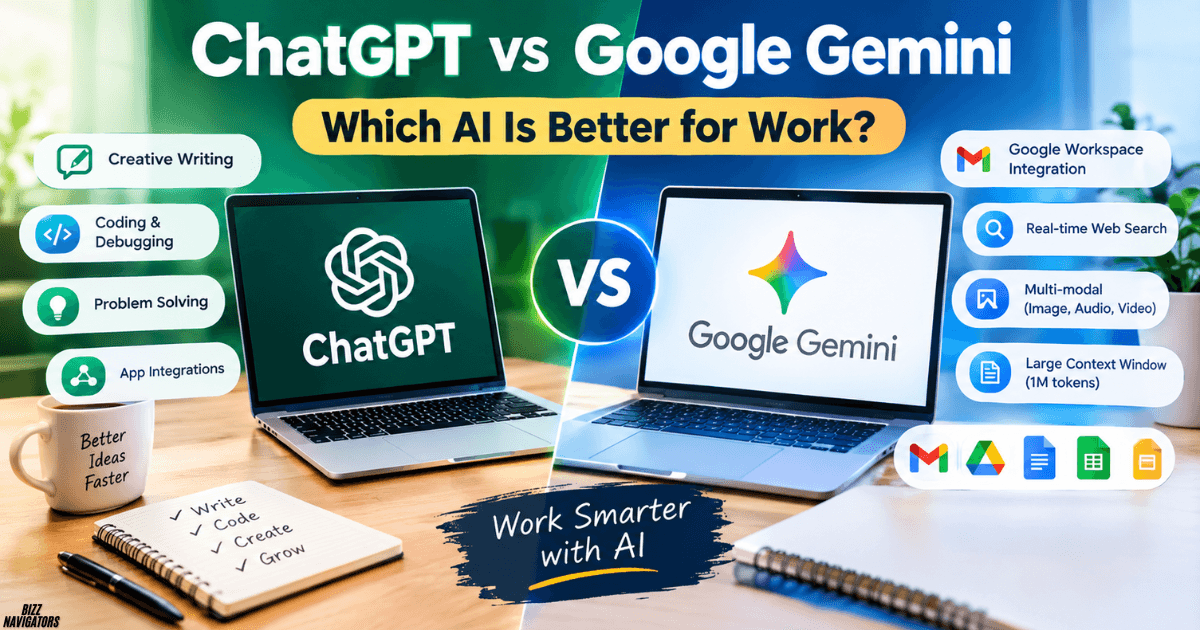
If you use AI to handle daily work, choose Google Gemini if your business relies on Gmail, Google Docs, Google Sheets, and Google Drive. Choose ChatGPT if you need flexible writing, coding help, detailed problem-solving, and a broad range of work tasks. The better option depends on your workflow, budget, and the tools you already use.
This comparison of ChatGPT vs Google Gemini for work will help you decide which assistant fits your needs, whether you’re a freelancer, student, business owner, developer, or part of a larger team.
Both AI assistants can help you write emails, summarize documents, research topics, analyze information, and generate ideas. However, their integrations, features, and subscription plans differ.
ChatGPT vs Google Gemini for Work: Key Differences
| Feature | ChatGPT | Google Gemini |
| Best for | Writing, coding, reasoning, and varied tasks | Google Workspace workflows and research |
| Email assistance | Drafting, rewriting, and organizing tasks | Assistance within Gmail, depending on your plan |
| Documents | Drafting, analysis, and document review | Working with Google Docs and Drive |
| Spreadsheets | Data analysis and formula assistance | Google Sheets assistance and connected data |
| Coding | Code generation, debugging, and explanations | Code generation, explanations, and development assistance |
| Research | Web research and source-based answers | Web research and Google-connected workflows |
| Integrations | Supported apps and connected tools vary by plan | Google services and other supported integrations |
| Best fit | People with varied workflows | Teams already using Google’s ecosystem |
Quick verdict: If your work happens mainly inside Google Workspace, Gemini is a natural starting point. If you switch between writing, coding, analysis, brainstorming, and different tools, ChatGPT is worth testing first.
1. Which AI Is Better for Everyday Work?
Your best choice depends on the kind of work you do most often.
Choose ChatGPT if you need flexible assistance
ChatGPT is useful when you handle different types of tasks throughout the day. You can use it to draft business emails, improve website content, explain technical problems, write code, analyze uploaded files, and develop marketing ideas.
You can also refine its responses through follow-up instructions. For example, you can ask it to shorten a report, change the tone, explain a difficult concept, or turn your notes into a professional proposal.
ChatGPT also supports connected apps, although availability and actions depend on your plan, account, and workspace settings.
Choose Gemini if you work in Google Workspace
Gemini is especially convenient if your team uses Gmail, Docs, Sheets, Slides, and Drive. Depending on your subscription and available features, it can help draft emails, improve documents, summarize files, and find relevant information from connected sources.
For example, you could ask Gemini to summarize several project documents in Drive or identify important details in a spreadsheet. You can also review the sources it used to produce an answer.
Practical advice: Start with the assistant that fits your existing workflow. You will usually get more value from an AI tool that reduces everyday friction than from one with features you rarely use.
2. ChatGPT vs Google Gemini for Writing and Content Creation
If you write blog posts, reports, proposals, emails, or social media content, both assistants can help you work faster.
ChatGPT for creative and persuasive writing
ChatGPT is a strong option when you need to develop an idea through multiple revisions. You can request different tones, reorganize a draft, improve an introduction, or adapt content for different audiences.
For business writing, give it a clear audience, purpose, and desired tone. Instead of asking it to write a generic sales email, explain what you sell, who the customer is, and what action you want the reader to take.
Gemini for documents and collaborative work
Gemini can be particularly convenient when you already keep your work in Google Docs and Gmail. Eligible plans provide AI assistance within supported Workspace applications, helping you draft, refine, and summarize content without constantly switching tools.
Winner: ChatGPT is worth trying first for iterative creative writing and persuasive copy. Gemini may be more convenient when your writing process revolves around Google Workspace.
Neither tool guarantees accurate, original, or publication-ready content. Review facts, check sources, and edit the final draft before sharing it with customers or publishing it.
3. Which AI Is Better for Coding and Technical Work?
For developers, analysts, and technical teams, the choice depends on the complexity of your tasks and your development environment.
ChatGPT can help you generate code, explain unfamiliar functions, troubleshoot errors, plan software features, and break complex problems into smaller steps.
Gemini can also assist with programming, debugging, and understanding code. Google’s connected-app options may be useful for eligible users who need to reference information from supported services, including GitHub repositories.
Here is how you might use each assistant:
- ChatGPT: Ask it to explain an error, suggest a fix, write unit tests, or review an algorithm.
- Gemini: Ask it to explain a codebase, summarize technical documents, or assist with development tasks in your existing Google-centered workflow.
Winner: Test both using the same real coding problem. Compare whether the code runs, how well each explains its solution, and how many corrections you need to make. A confident answer is not necessarily a correct one.
4. Research, Data Analysis, and Large Documents
Research quality matters when you prepare reports, compare competitors, analyze customer feedback, or make business decisions.
Both ChatGPT and Gemini can support research and analysis, but you should judge them by the evidence they provide rather than the length of their answers.
ChatGPT for structured analysis
You can use ChatGPT to organize research questions, analyze supported file formats, identify patterns in data, and turn findings into a report. For example, upload a suitable sales spreadsheet and ask it to identify monthly changes, unusual results, and possible explanations.
Check the calculations and assumptions before using the findings to make decisions.
Gemini for Google-connected research
Gemini can be useful when relevant information already exists in your Google Workspace. Depending on access and settings, you can select files as sources, compare information across documents, and ask questions about specific spreadsheet ranges.
This can save time if you regularly work with shared reports, project notes, and internal documents.
What about the context window?
You may see claims that Gemini supports a context window of up to one million tokens. Treat that as a model- and plan-specific capability rather than a guarantee for every Gemini account or task. Available limits can change.
A larger context window can help when you need to process extensive material, but it does not automatically make an answer more accurate. Source quality, retrieval, reasoning, and verification still matter.
Winner: Gemini is a natural option for Google-connected research. ChatGPT is worth testing for structured analysis across varied tasks. For important decisions, verify both tools’ conclusions against the original data.
5. ChatGPT vs Google Gemini for Business Productivity
The biggest difference often appears in your daily workflow rather than in a single answer.
| Work task | ChatGPT | Google Gemini |
| Customer emails | Draft, rewrite, and personalize replies | Assist with Gmail workflows on eligible plans |
| Business reports | Organize findings and produce drafts | Summarize and work with supported Workspace sources |
| Marketing campaigns | Develop copy, concepts, and variations | Assist with content creation and Google-based workflows |
| Meetings | Help prepare agendas and summarize provided notes | Offer eligible meeting and Workspace features |
| Spreadsheet analysis | Analyze supported files and explain patterns | Assist with supported Sheets tasks and sources |
| Team collaboration | Use available connected apps and workspace features | Work within eligible Google Workspace services |
For the best results, identify the tasks that consume the most time in your business. Test each assistant against those tasks rather than choosing based on a general ranking.
Can ChatGPT connect to business apps?
Yes. ChatGPT supports connected apps that can bring information from services such as Google Drive and Slack into conversations. The available integrations, permissions, and actions depend on your account and plan.
Can Gemini connect to third-party tools?
Yes. Eligible Gemini for Google Workspace plans support certain third-party integrations, including services such as Asana and Mailchimp. Availability and subscription requirements vary.
You should therefore avoid assuming that either assistant supports every business application. Check the current integration directory and your organization’s settings before committing.
6. ChatGPT vs Google Gemini Pricing: Which Offers Better Value?
Your total cost depends on more than the advertised subscription price. Consider usage limits, included features, storage, team administration, and the tools you already pay for.
ChatGPT pricing
ChatGPT offers a free option, while ChatGPT Plus is listed at $20 per month on OpenAI’s official help page. Paid plans provide broader access to models and tools, with specific limits depending on the current offering.
For a freelancer, an individual subscription may be enough. A business should separately assess the features, data controls, and administration available under the relevant business plan.
Google Gemini pricing
Google offers Gemini access through different personal AI plans and Google Workspace subscriptions. For businesses, the Workspace plan matters because it can bundle AI features with business email, storage, and collaboration tools.
Google’s published Workspace pricing varies by edition, billing arrangement, and promotional offer. Check the official Google Workspace pricing page for current details.
Which is cheaper?
There is no universal winner. If you already pay for Google Workspace, an eligible plan may provide the Gemini features you need without requiring a separate personal AI subscription. If your priority is general-purpose AI assistance, compare ChatGPT’s current plans against the features you will actually use.
Remember that free access, storage allowances, usage limits, and premium features are separate considerations. Do not assume a free AI tier includes every business integration or advanced capability.
7. Privacy, Security, and Trust at Work
Before connecting an AI assistant to your business accounts, consider what information it can access, how your organization manages that access, and which data policies apply.
Should you connect your work account?
Connect only the services you need. Review requested permissions, use approved business accounts, and follow your organization’s policies before allowing access to customer records, financial documents, confidential emails, or internal reports.
Google provides administrative controls for connected Gemini apps on eligible work and school accounts. ChatGPT also provides app permissions and workspace controls, depending on the plan and integration.
How can you improve privacy?
- Review permissions before connecting an app.
- Avoid sharing passwords, payment details, and unnecessary sensitive information.
- Use your organization’s approved AI account and data policies.
- Verify important answers using reliable sources.
- Disconnect integrations you no longer need.
- Check the applicable data retention and training policies before uploading confidential information.
Neither assistant should be treated as automatically correct or risk-free. The appropriate choice depends on your organization’s security requirements, account configuration, and the type of information you process.
8. How to Choose the Right AI for Your Job
Use these recommendations as a starting point:
For writers and marketers
Try ChatGPT first if you frequently revise articles, develop campaigns, write persuasive copy, and adjust tone for different audiences.
For Google Workspace teams
Try Gemini if you regularly work across Gmail, Docs, Sheets, and Drive and want AI assistance integrated into those tools.
For developers
Test both with your actual code, repository, debugging tasks, and development environment. Choose the one that produces the most reliable results with the least correction.
For small business owners
Compare the tools using three everyday tasks: writing a customer email, analyzing a business report, and preparing a marketing plan. Include subscription and integration costs in your decision.
9. Frequently Asked Questions
How does Google AI compare to ChatGPT?
Google’s Gemini is closely integrated with Google services, while ChatGPT offers flexible conversational assistance across writing, coding, analysis, and supported connected apps. Your workflow determines which is more useful.
Is Google AI more trustworthy than ChatGPT?
Neither is consistently trustworthy in every situation. Both can produce incorrect information. Check sources, verify important facts, and avoid relying on either assistant without review.
What are the top 3 AI right now?
There is no single ranking for every task. ChatGPT, Google Gemini, and Anthropic’s Claude are three options worth comparing for general business work. The best choice depends on features, price, and performance on your tasks.
Is Gemini AI better than ChatGPT?
Gemini may be better for Google Workspace workflows. ChatGPT may suit you better for iterative writing, coding, and varied problem-solving. Test both against your actual requirements.
Does Google have AI like ChatGPT?
Yes. Google offers Gemini, an AI assistant that can answer questions, help create content, assist with coding, and work with supported Google services.
Is Google AI free to use?
Gemini offers free access options, but availability, usage limits, and advanced features depend on the account and current plan.
What’s a better AI than ChatGPT?
There is no universal alternative that is better for every task. Gemini, Claude, and other specialized assistants may be better suited to particular workflows.
What Gemini do I get with Google Workspace?
The features you receive depend on your Workspace edition, subscription, region, and administrator settings. Check your plan’s current feature list before purchasing or upgrading.
Is Gemini for Google Workspace worth it?
It can be worthwhile if your team frequently uses Gmail, Docs, Sheets, Drive, and other supported Workspace applications. Its value is lower if you rarely use those tools or already have a suitable alternative.
What does Gemini do in Google Workspace?
Depending on your eligible plan, Gemini can help draft emails, refine documents, summarize information, assist with spreadsheets, and work with selected files and connected sources.
Should I allow Gemini to access my Google Workspace?
Allow access only when the feature is necessary and permitted by your organization’s policies. Review permissions, consider the sensitivity of your data, and consult your administrator if you are unsure.
Is Gemini free with a Google Business Account?
Not necessarily. Access to Gemini features varies by Workspace edition and subscription. A business account alone does not guarantee access to every feature.
Is Gemini AI free with Google Workspace?
Some plans include certain Gemini features, while others offer different levels of access. Check your Workspace subscription rather than assuming all AI features are free.
What is the disadvantage of Google Workspace?
Potential disadvantages include recurring subscription costs, dependence on Google’s ecosystem, feature differences between plans, and the need to manage permissions and organizational data carefully.
Is there anything better than Google Gemini?
Yes, depending on the task. ChatGPT may be a better fit for some writing and coding workflows, while Claude or specialized tools may suit other needs. Compare actual results rather than relying on rankings alone.
What is a better alternative to Google?
If you mean Google’s AI assistant, ChatGPT and Claude are alternatives worth testing. If you mean Google services more broadly, the best replacement depends on whether you need email, documents, search, cloud storage, or collaboration.
Is Google Gemini great?
Gemini can be highly useful for research, content creation, and Google Workspace tasks. Its usefulness still depends on your needs, the available features, and the accuracy of its responses.
Is Google Gemini safe or not?
Gemini can be used responsibly, but no AI service is risk-free. Review account protections, app permissions, data policies, and your organization’s rules before sharing sensitive information.
Should I trust ChatGPT or Gemini?
Use either as an assistant, not as your only source of truth. Verify critical information, especially financial, legal, medical, security, and business claims.
Should I stop using Google Gemini?
Not necessarily. If Gemini helps you work efficiently and meets your privacy requirements, there may be no reason to stop. Consider alternatives if its limitations affect your workflow.
Is ChatGPT the best AI?
ChatGPT is a strong general-purpose assistant, but it is not automatically the best option for every person or task. Compare its results, cost, integrations, and limitations with those of other tools.
Is AI technology good or bad?
AI can improve productivity, support learning, and automate repetitive tasks. It can also introduce errors, privacy concerns, bias, and overreliance. Its impact depends on how people develop, use, and supervise it.
Is Grok 3 really the best AI?
You cannot establish that from its name or a single benchmark. Grok 3 is a specific model, and comparisons should account for model versions, current availability, task performance, and independent testing.
Is ChatGPT a person?
No. ChatGPT is an AI system that generates responses to your prompts. It can communicate naturally, but that does not make it a human being.
Who’s smarter, AI or Google?
Google is a company and technology ecosystem, while AI refers to a broad category of systems. If you mean Gemini versus ChatGPT, compare how well each handles the task you need to complete.
Is ChatGPT making us dumb?
Not automatically. AI can help you learn when you question its answers and work through problems yourself. If you copy every response without understanding it, you may miss opportunities to develop your own skills.
Who is Google’s biggest enemy?
Google has many competitors, not a single enemy. Depending on the market, these include Microsoft, OpenAI, Apple, and other companies competing in search, AI, productivity software, and digital services.
10. Final Verdict: ChatGPT or Google Gemini for Work?
Choose the assistant that makes your daily work easier, not the one that claims to be the smartest.
- Choose Gemini if your team depends on Google Workspace and wants AI assistance within its existing workflow.
- Choose ChatGPT if you need a flexible assistant for writing, coding, analysis, brainstorming, and a range of business tasks.
- Test both if you have a demanding workflow and want to compare accuracy, time saved, and subscription costs before committing.

At BizzNavigators, we answer the questions you’re actually searching for, honestly and clearly. We check our facts before we publish anything, and if we’re not sure about something, we tell you instead of guessing. Whatever you’re looking for- a tech fix, a business tip, or a simple how-to- we want to give you an answer you can trust.